10亿+海关交易数据,1.2亿企业数据,2亿+企业联系人数据,1000千万真实采购商。覆盖200+个国家及地区,95%外贸重点拓展市场,可根据行业、经营范围等多方位挖掘目标客户。
免费试用
关系上传数据允许您为目录中的不同商品之间建立可选关系。有两种类型的关系:
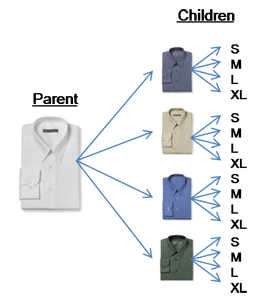
变体 — 这是最常见的关系类型。它允许买家从同一商品的一系列变体中进行挑选。例如,一件衬衫可能有很多尺码和颜色。主商品(父项 SKU)是该衬衫一般情况下的类型。它没有尺码、颜色、商品价格或数量,并且不能购买。变体(子项 SKU)是衬衫所有不同的尺码和颜色的结合,并且可以购买。(请看下面的图表。)
上传新的父/子关系的关系上传数据之前,上传 SKU 的商品上传数据。在该上传数据中,指定父项 SKU 为“父项”,方法是使用 父子商品 元素,并且指定子项 SKU 是如何变化的(例如尺寸或尺寸颜色),方法是使用 变体主题 元素。同样地,将每个子项 SKU 指定为“子项”,方法是使用 父子商品 元素,并且指定相同的变体主题,方法与为父项 SKU 指定变体主题一样。
请注意,是变体主题和它相关的属性(例如变体主题颜色尺寸的颜色和尺寸)是在您的商品上传数据里定义的。关系上传数据只能构建父项商品和子项商品之间的实际关系。
注意:每个类别对于其变体都有单独的特定要求。请查看一个指定类别的商品 XSD 了解如何为该类别创建变体关系。
配件 — 一些商品可以划分成为其他商品的配件。例如,一件便携式无线电电子产品可能会把电池和外接扬声器当成配件。与之类似,手套也可能被指定为帽子的配件。

元素 | 描述 |
父项 SKU | 有多个变体的商品的主 SKU |
关系 | 子项 SKU 和关系信息的类型分为以下部分: SKU — 用来识别一项单独商品,即父项 SKU 的一个(子项)变体。 |
https://images-na.ssl-images-amazon.com/images/G/01/rainier/help/xsd/release_1_9/Relationship.xsd
<!- Revision="$Revision: #1 $"
-->
<xsd:schema elementFormDefault="qualified">
<xsd:include schemaLocation="amzn-base.xsd" />
<xsd:element name="Relationship">
<xsd:complexType>
<xsd:sequence>
<xsd:element name="ParentSKU" type="SKUType" />
<xsd:element name="Relation" maxOccurs="unbounded">
<xsd:complexType>
<xsd:sequence>
<xsd:element ref="SKU" />
<xsd:element name="Type">
<xsd:simpleType>
<xsd:restriction base="xsd:string">
<xsd:enumeration value="Variation" />
<xsd:enumeration value="DisplaySet" />
<xsd:enumeration value="Collection" />
<xsd:enumeration value="Accessory" />
<xsd:enumeration value="Customized" />
<xsd:enumeration value="Part" />
<xsd:enumeration value="Complements" />
<xsd:enumeration value="Piece" />
<xsd:enumeration value="Necessary" />
<xsd:enumeration value="ReplacementPart" />
<xsd:enumeration value="Similar" />
<xsd:enumeration value="Episode" />
<xsd:enumeration value="Season" />
</xsd:restriction>
</xsd:simpleType>
</xsd:element>
</xsd:sequence>
</xsd:complexType>
</xsd:element>
</xsd:sequence>
</xsd:complexType>
</xsd:element>
</xsd:schema>
<?xml version="1.0" encoding="utf-8" ?>
<AmazonEnvelope noNamespaceSchemaLocation="amzn-envelope.xsd">
<Header>
<DocumentVersion>1.01</DocumentVersion>
<MerchantIdentifier>M_SELLER_354577</MerchantIdentifier>
</Header>
<MessageType>关系</MessageType>
<Message>
<MessageID>1</MessageID>
<OperationType>更新</OperationType>
<Relationship>
<ParentSKU>5555_5556</ParentSKU>
<Relation>
<SKU>555540352 </SKU>
<Type>变体</Type>
</Relation>
<Relation>
<SKU>555685952 </SKU>
<Type>变体</Type>
</Relation>
<Relation>
<SKU>555690352 </SKU>
<Type>变体</Type>
</Relation>
<Relation>
<SKU>555690552 </SKU>
<Type>变体</Type>
</Relation>
<Relation>
<SKU>555690752 </SKU>
<Type>变体</Type>
</Relation>
<Relation>
<SKU>555690952 </SKU>
<Type>变体</Type>
</Relation>
</Relationship>
</Message>
</AmazonEnvelope>
<?xml version="1.0" encoding="utf-8" ?>
<AmazonEnvelope noNamespaceSchemaLocation="amzn-envelope.xsd">
<Header>
<DocumentVersion>1.01</DocumentVersion>
<MerchantIdentifier>M_SELLER_354577</MerchantIdentifier>
</Header>
<MessageType>关系</MessageType>
<Message>
<MessageID>1</MessageID>
<OperationType>更新</OperationType>
<Relationship>
<ParentSKU>ASUSVNA1</ParentSKU>
<Relation>
<SKU>ASUSVNA198714G</SKU>
<Type>配件</Type>
</Relation>
</Relationship>
</Message>
<Message>
<MessageID>2</MessageID>
<OperationType>更新</OperationType>
<Relationship>
<ParentSKU>FUJI32XD </ParentSKU>
<Relation>
<SKU>ALPSCARD0024</SKU>
<Type>配件</Type>
</Relation>
</Relationship>
</Message>
</AmazonEnvelope>
亚马逊官网原文详情:
Establish Product Relationships - Relationship Feed Schema (not applicable to all categories)
Description
The Relationship feed allows you to set up optional relationships between items in your catalog. There are two types of relationships:
Variation – This is the most common type of relationship. It allows customers to select from a list of variations of the same product. For example, a shirt might come in a variety of sizes and colors. The main item (parent SKU) is the type of shirt in general. It does not have a size, color, price, or quantity and is not buyable. The variations (child SKUs) are all of the different size and color combinations of the shirt, and are buyable. (See the diagram below.)
Before uploading a relationship feed for a new parent/child relationship, upload the product feed for the SKUs. In that feed, designate the parent SKU as "parent" using the Parentage element, and designate how the child SKUs will vary (for example, Size or SizeColor) using the VariationTheme element. Likewise, designate each child SKU as "child" using the Parentage element, and designate the same VariationTheme as for the parent SKU.
Note that VariationTheme as well as its associated attributes (for example, Size and Color for the VariationTheme SizeColor) are defined in your product feed. The Relationship feed only builds the actual relationships between the parent and child items.
Note: Each category has individual specific requirements for variations. See the product XSD for a specific category to learn how to set up a variation relationship for that category.
Accessory – Some items can be classified as accessories for other items. For example, a portable radio electronics item might have batteries and external speakers as accessories. Similarly, a pair of gloves might be designated as accessories for a hat.
Dictionary
Element
Description
ParentSKU
The master SKU for a product with variations
Relation
Child SKU and type of relationship information, broken into the following components:
SKU – Used to identify an individual product, one (child) variation of the parent SKU
Type – Type of relationship, variation or accessory
XSD
https://images-na.ssl-images-amazon.com/images/G/01/rainier/help/xsd/release_1_9/Relationship.xsd
<!- Revision="$Revision: #1 $"
-->
<xsd:schema xmlns:xsd="http://www.w3.org/2001/XMLSchema" elementFormDefault="qualified">
<xsd:include schemaLocation="amzn-base.xsd" />
<xsd:element name="Relationship">
<xsd:complexType>
<xsd:sequence>
<xsd:element name="ParentSKU" type="SKUType" />
<xsd:element name="Relation" maxOccurs="unbounded">
<xsd:complexType>
<xsd:sequence>
<xsd:element ref="SKU" />
<xsd:element name="Type">
<xsd:simpleType>
<xsd:restriction base="xsd:string">
<xsd:enumeration value="Variation" />
<xsd:enumeration value="DisplaySet" />
<xsd:enumeration value="Collection" />
<xsd:enumeration value="Accessory" />
<xsd:enumeration value="Customized" />
<xsd:enumeration value="Part" />
<xsd:enumeration value="Complements" />
<xsd:enumeration value="Piece" />
<xsd:enumeration value="Necessary" />
<xsd:enumeration value="ReplacementPart" />
<xsd:enumeration value="Similar" />
<xsd:enumeration value="Episode" />
<xsd:enumeration value="Season" />
</xsd:restriction>
</xsd:simpleType>
</xsd:element>
</xsd:sequence>
</xsd:complexType>
</xsd:element>
</xsd:sequence>
</xsd:complexType>
</xsd:element>
</xsd:schema>
Example (Variation)
<?xml version="1.0" encoding="utf-8" ?>
<AmazonEnvelope xmlns:xsi="http://www.w3.org/2001/XMLSchema-instance" xsi:noNamespaceSchemaLocation="amzn-envelope.xsd">
<Header>
<DocumentVersion>1.01</DocumentVersion>
<MerchantIdentifier>M_SELLER_354577</MerchantIdentifier>
</Header>
<MessageType>Relationship</MessageType>
<Message>
<MessageID>1</MessageID>
<OperationType>Update</OperationType>
<Relationship>
<ParentSKU>5555_5556</ParentSKU>
<Relation>
<SKU>555540352</SKU>
<Type>Variation</Type>
</Relation>
<Relation>
<SKU>555685952</SKU>
<Type>Variation</Type>
</Relation>
<Relation>
<SKU>555690352</SKU>
<Type>Variation</Type>
</Relation>
<Relation>
<SKU>555690552</SKU>
<Type>Variation</Type>
</Relation>
<Relation>
<SKU>555690752</SKU>
<Type>Variation</Type>
</Relation>
<Relation>
<SKU>555690952</SKU>
<Type>Variation</Type>
</Relation>
</Relationship>
</Message>
</AmazonEnvelope>
Example (Accessory)
<?xml version="1.0" encoding="utf-8" ?>
<AmazonEnvelope xmlns:xsi="http://www.w3.org/2001/XMLSchema-instance" xsi:noNamespaceSchemaLocation="amzn-envelope.xsd">
<Header>
<DocumentVersion>1.01</DocumentVersion>
<MerchantIdentifier>M_SELLER_354577</MerchantIdentifier>
</Header>
<MessageType>Relationship</MessageType>
<Message>
<MessageID>1</MessageID>
<OperationType>Update</OperationType>
<Relationship>
<ParentSKU>ASUSVNA1</ParentSKU>
<Relation>
<SKU>ASUSVNA198714G</SKU>
<Type>Accessory</Type>
</Relation>
</Relationship>
</Message>
<Message>
<MessageID>2</MessageID>
<OperationType>Update</OperationType>
<Relationship>
<ParentSKU>FUJI32XD </ParentSKU>
<Relation>
<SKU>ALPSCARD0024</SKU>
<Type>Accessory</Type>
</Relation>
</Relationship>
</Message>
</AmazonEnvelope>
文章来源:亚马逊官方网站
(本文内容根据网络资料整理和来自用户投稿,出于传递更多信息之目的,不代表本站其观点和立场。本站不具备任何原创保护和所有权,也不对其真实性、可靠性承担任何法律责任,特此声明!)
关系输入是指那些与多个已有数据对象相关联的数据,例如一个商品可以与多个分类相关联,一个订单可以与多个商品相关联。这些关系需要使用关系输入框架定义。
如何定义一个商品与分类的多对多关系?首先需要定义商品和分类两个数据类型,然后定义一个关系输入类型以定义它们的关系,如商品分类关联。然后在商品和分类数据类型中各自添加一个关系输入字段来引用此关系。关系输入类型需要指定两个参与关系的类型并设置关系类型为多对多。
是否必须为关系输入设置约束条件?不是必须的,但为关系输入设置一些校验规则比如唯一性、必填等是个好的做法。例如为商品分类关联关系输入可以设置一个规则要求分类不能为空。这有助于提高数据质量。
如何在管理界面中使用关系输入类型呈现和编辑关系?在产品或订单等对象的后台管理界面中,可以使用关系约束标签结合过滤器组件动态获取关联对象的数据,呈现为多选或树形选择框供用户选择编辑关联关系。提交后系统会自动为两端关系维护对应记录。


 印度尼西亚
印度尼西亚 越南
越南 印度
印度 菲律宾
菲律宾 土耳其
土耳其 美国
美国 墨西哥
墨西哥 加拿大
加拿大 危地马拉
危地马拉 歌诗达黎加
歌诗达黎加 阿根廷
阿根廷 巴西
巴西 智利
智利 哥伦比亚
哥伦比亚 秘鲁
秘鲁 俄罗斯
俄罗斯 乌克兰
乌克兰 法国
法国 德国
德国 意大利
意大利 埃塞俄比亚
埃塞俄比亚 乌干达
乌干达 博茨瓦纳
博茨瓦纳 加纳
加纳 肯尼亚
肯尼亚 澳大利亚
澳大利亚 新西兰
新西兰 斐济
斐济 维尔京群岛
维尔京群岛 关岛
关岛